AI Video Subtitle Remover

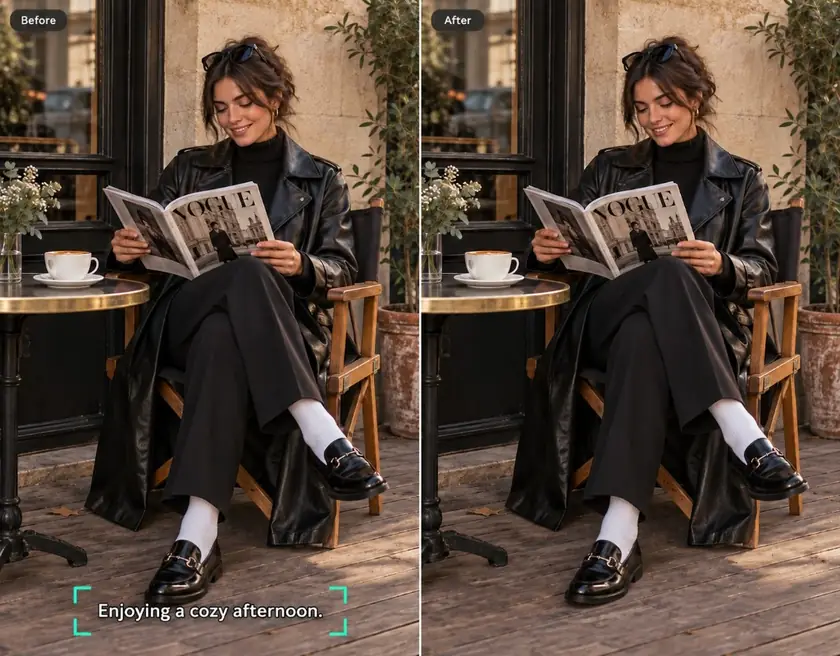
Remove hardcoded subtitles from videos in just one click. Whether you want to reuse old videos, create multilingual versions, or prepare footage for editing, AI rebuilds every frame naturally to deliver clean, high-quality results, making it easy to reuse, translate, edit, and republish your videos.
Sample Video

What is an AI Video Subtitle Remover?

An AI Video Subtitle Remover uses advanced AI to detect and erase hardcoded subtitles while naturally rebuilding the hidden background behind them. Instead of simply covering subtitle areas, it reconstructs every frame with consistent textures, colors, and details for smooth, professional-looking results. Loova helps you remove subtitles from video quickly without manual frame-by-frame work.

INPUT
OUTPUT
Highlights

Why Choose Loova AI Caption Remover?

Remove Hardcoded Subtitles Effortlessly

Remove Hardcoded Subtitles Effortlessly

Upload your video and let AI remove hardcoded subtitles in just one click. Our powerful video subtitle remover detects embedded captions automatically, and delivers a polished clean output so you don't need to edit frame by frame. Get a clean video that is ready for translation, repurposing, or sharing in minutes.
Frame-by-frame AI Reconstruction

Frame-by-frame AI Reconstruction

Every frame is rebuilt intelligently after subtitles are removed, keeping textures, colors, and lighting consistent throughout the video. AI fills the missing areas naturally to reduce flickering, ghosting, and visible artifacts. It helps you remove subtitles from video while preserving a smooth and professional look.
Reliable Even in Complex Scenes

Reliable Even in Complex Scenes

Subtitle removal stays accurate even when people move across the screen or backgrounds contain fine details. The AI adapts to low-light scenes, crowded environments, and rapid scene transitions for more dependable results. From cinematic footage to social media clips, your videos remain clean and natural.
Support Any Language and Script

Support Any Language and Script

Remove embedded subtitles in English, Chinese, Japanese, Arabic, Spanish, and many other languages with ease. The AI recognizes different subtitle styles, fonts, colors, and layouts without extra settings, saving you time on manual adjustments. No matter where your video comes from, cleaning it up is simple and efficient.
One-Click Removal, Fast Processing

One-Click Removal, Fast Processing

Simply upload your video, start the process, and let AI handle the rest automatically. There is no complicated editing or manual masking required, making it easy to remove captions from video in just a few clicks. Fast processing lets you finish more projects in less time while maintaining high-quality results.

One Step Further: Explore More Editing Tools

Removing subtitles is only the beginning. Continue enhancing your videos with AI tools for editing, background removal, video enhancement, and more without switching platforms. Everything you need to create polished content is available in one place.
Use Cases

Use Cases of AI Subtitle Remover

Clean Movie and TV Clips for Editing

Clean Movie and TV Clips for Editing

Clear subtitles from movie scenes and TV clips to make remixing easier. Add your own captions, effects, or translations with more flexibility.
Refresh Old Social Media Content

Refresh Old Social Media Content

Give your older videos a fresh look by removing outdated subtitles before reposting. Update captions, translate your content, or create platform-specific versions without filming everything again.
Remove Subtitles Before Adding New Branding

Remove Subtitles Before Adding New Branding

Clear embedded subtitles before adding your own captions, logos, or promotional messages. Create clean, professional videos that better match your brand identity and marketing campaigns.
Make Multilingual Videos

Make Multilingual Videos

Remove existing subtitles before adding translations for a cleaner result. Easily adapt videos for different languages without starting over.
Steps

How to Use AI Caption Remover?

1

Upload Video

Upload the video you want to clean up. Loova supports popular video formats, making it easy to get started with just a few clicks.
2

Input Prompt

Describe what you want the AI to do using this sample prompt.
**Sample Prompt:** *Remove all subtitles from the video while naturally restoring the background and keeping every frame clean and consistent.*
3

Choose Settings

Select your preferred AI model and adjust settings such as output quality or aspect ratio if needed. You can keep the default options for fast, high-quality results.
4

Generate and Export

Click "Generate" and let AI remove the subtitles automatically. Preview the subtitle-free video, then export it in high quality for editing, sharing, or publishing.
Pricing

Find What Suits You Best

Monthly
Annual
SAVE 40%
Lite

For beginners first exploring AI creation

credits/mo.
Fixed amount of 300 credits/mo
$15/mo
Billed annually
No difference compared to monthly
Seedance 2.0 Series
Seedance 2.0
NO ACCESS
Seedance 2.0 Fast
720p · $0.40/s
Seedance 2.0 Mini
720p · $0.25/s
EXCLUSIVE OFFER
Nano Banana 2 & Pro
ACCESS
GPT Image 2
ACCESS
300 credits/month
Access to basic AI Agent model
Access to selected video models
Access to selected image and editing models
Concurrent: Video 2 & Image 4
Early access to new AI features
Lowest cost per credit
Discount for extra credits
Unlimited Relax Generation
Kling O1 Video, Edit
Kling Motion Control
Seedream 5.0, Grok Imagine, Kling O3 Image
Unlimited Seedance 1.5 Pro
Pro
20% OFF

For enthusiasts creating occasionally

credits/mo.
Fixed amount of 1200 credits/mo
$49$39.2/mo
Billed annually
Save ~$118 compared to monthly
Seedance 2.0 Series
Seedance 2.0
720p · $0.32/s
Seedance 2.0 Fast
720p · $0.26/s
Seedance 2.0 Mini
720p · $0.16/s
EXCLUSIVE OFFER
Nano Banana 2 & Pro
ACCESS
GPT Image 2
ACCESS
1200 credits/month
Access to premium AI Agent models
Access to all video models
Access to all image & editing models
Concurrent: Video 6 & Image 8
Early access to new AI features
Lowest cost per credit
Discount for extra credits
Unlimited Relax Generation
Learn more
Kling O1 Video, Edit
365 UNLIMITED
Kling Motion Control
365 UNLIMITED
Seedream 5.0, Grok Imagine, Kling O3 Image
Unlimited Seedance 1.5 Pro
MOST POPULAR
Unlimited Nano Banana Pro
Max
LIMITED OFFER
30% OFF

The smart choice for pros creating daily

credits/mo.
Fixed amount of 3000 credits/mo
$99$69.3/mo
Billed annually
Save ~$476 compared to monthly
Seedance 2.0 Series
Seedance 2.0
720p · $0.23/s
Seedance 2.0 Fast
-
%
720p · $0.14/s
Seedance 2.0 Mini
-
%
720p · $0.09/s
EXCLUSIVE OFFER
Nano Banana 2 & Pro
2K
365 UNLIMITED
GPT Image 2
2K
365 UNLIMITED
3000 credits/month
Access to premium AI Agent models
Access to all video models
Access to all image & editing models
Concurrent: Video 8 & Image 12
Early access to new AI features
Lowest cost per credit
Discount for extra credits
Unlimited Relax Generation
Learn more
Kling O1 Video, Edit
365 UNLIMITED
Kling Motion Control
365 UNLIMITED
Seedream 5.0, Grok Imagine, Kling O3 Image · 2K
365 UNLIMITED
Seedance 1.5 Pro
365 UNLIMITED
BEST VALUE
Seedance 2.0 720p · from $0.10/s
Ultimate
LIMITED OFFER
40% OFF

For experts scaling production to the max

credits/mo.
Fixed amount of 8000 credits/mo
$249$137.4/mo
Billed annually
Save ~$1554 compared to monthly
Seedance 2.0 Series
Seedance 2.0
-
%
720p · $0.
/s
Seedance 2.0 Fast
-
%
720p · $0.
/s
Seedance 2.0 Mini
-
%
720p · $0.
/s
EXCLUSIVE OFFER
Nano Banana 2 & Pro
2K
365 UNLIMITED
GPT Image 2
2K
365 UNLIMITED
8000 credits/month
Access to premium AI Agent models
Access to all video models
Access to all image & editing models
Concurrent: Video 12 & Image 12
Early access to new AI features
Lowest cost per credit
80% CHEAPER
15% off extra credits
Extra
Unlimited Relax Generation
Learn more
Kling O1 Video, Edit
365 UNLIMITED
Kling Motion Control
365 UNLIMITED
Seedream 5.0, Grok Imagine, Kling O3 Image · 2K
365 UNLIMITED
Seedance 1.5 Pro
365 UNLIMITED

AI Subtitle Remover FAQs

Remove Subtitles, Unlock More Possibilities

Turn subtitle-covered videos into clean, reusable content in just a few clicks. Whether you're editing, translating, repurposing, or sharing across platforms, Loova helps you create polished videos faster with AI-powered subtitle removal.